Generating Convex Hulls from Multi-ROIs
Dragonfly lets you generate convex hulls in which each labeled class of the multi-ROI will be a filled or outlined multi-ROI
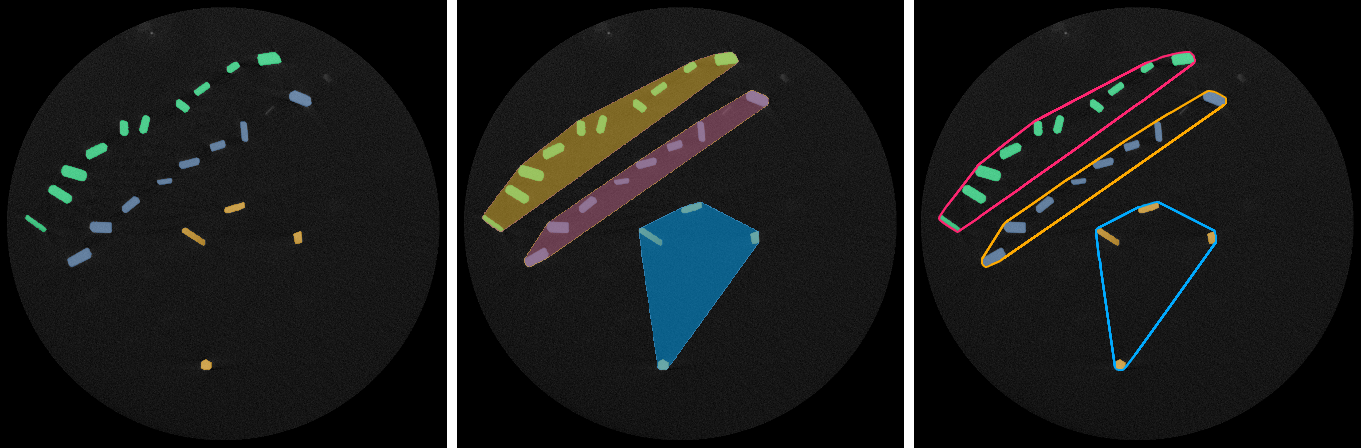
In the illustration below, convex hulls were generated from a multi-ROI with three classes of grouped particles.
Original multi-ROI (left) and convex hulls generated filled multi-ROIs (center) and as outlined multi-ROIs (right)
| Type | Description |
|---|---|
| Multi-ROI, Each Label Being Filled | Generates a new multi-ROI in which each labeled class of the multi-ROI is a filled convex hull. |
| A Multi-ROI, Each Label as an Outer Shell | Generates a new multi-ROI in which each labeled class of the multi-ROI is an outlined convex hull. |
| A Mesh for Each Multi-ROI Label | Generates a series of meshes as convex hulls, one for each labeled class of the multi-ROI. |
- Right-click the required multi-ROI in the Data Properties and Settings panel.
- Choose Generate Convex Hull As in the pop-up menu and then the type of convex hull(s) you want to generate.
The Binning dialog appears.
- Select a Binning factor within the range of 1 to 8, as required.
Note Binning is the downsampling factor used when generating the space where the convex hull is created prior to its re-projection in the initial space.
- Click OK to generate the convex hull(s).
